
Working as a digital workplace consultant and architect for more than 20 years, I reflect on why do we still need virtual apps and desktop solutions, and how can we move beyond it? It pretty much boils down to rationalizing legacy applications. Legacy applications are traditional client server apps that for security, OS compatibility and network latency reasons needs to be delivered with a virtual apps or desktop technology. Whenever I discuss the question “how long will we have to deal with legacy apps” with other experts in EUC (End User Computing), the answer is usually “forever”. In this article I will look at how you can build a strategy to reduce your dependency on Legacy apps.
I think the problem is two sided. On one side, we have legacy apps that is a strategic choice for the business, and there are few good modern alternatives. The other challenge is that there are actually so many good EUC tools out there to “cope with legacy” (virtual apps and desktop tools) that there is no urgency to change the legacy apps. “We just deliver it using Citrix or VMWare”. And it works! But it comes with a cost. Now that pricing is going up for many of these tools a lot of companies are looking at alternatives for dealing with virtual apps and desktops. I’ve written about this topic here.
One of the best ways to reduce your dependency on virtual apps and desktops, is actually to reduce your dependency on legacy apps. The way to do this, can be using an Enterprise Architecture tool to map out all your applications.
“An Enterprise Architecture (EA) tool is a software platform that helps large organizations align their IT resources with their business goals and processes. It provides a central repository to capture, model, and analyse the interrelationships and interdependencies within the enterprise’s ecosystem. This facilitates informed decision-making, collaboration, and management of complex IT infrastructures.” (Copilot generated)
The point here is to look at both the business and technical fitness of each application. Once you have this done you will be able to categorize into these 4 quadrants with a corresponding strategy. (Picture is from Ardoq Enterprise Architecture tool.
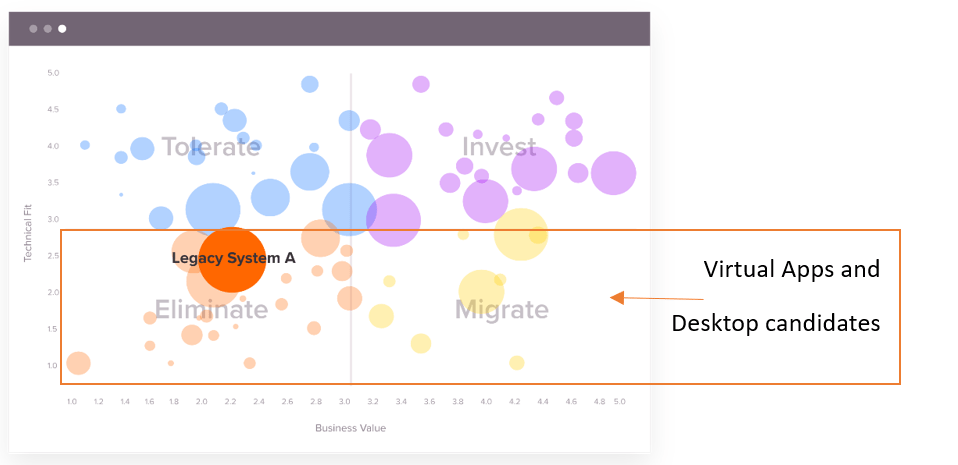
Now, on those who are “Technical fit” you can use a modern management tool like Intune to manage and secure, and Entra ID for securing identity and access. On the applications scoring low on technical fit, you can split in two based on business value. Those with low business value you can start planning to eliminate. These are driving a lot of cost without giving much business value. Those with high business value and low technical fit, these are your virtual applications and desktop candidates. These needs a longer roadmap to modernize. In Ardoq you can make an application lifecycle roadmap. For example, you can look at when you have to renew contracts, do major upgrades or renew licenses and find the best time to do replace these applications with a more modern alternative. The data gathered using EA tool, can also give you insights into other inter dependencies between applications and projects and enable you to plan better.
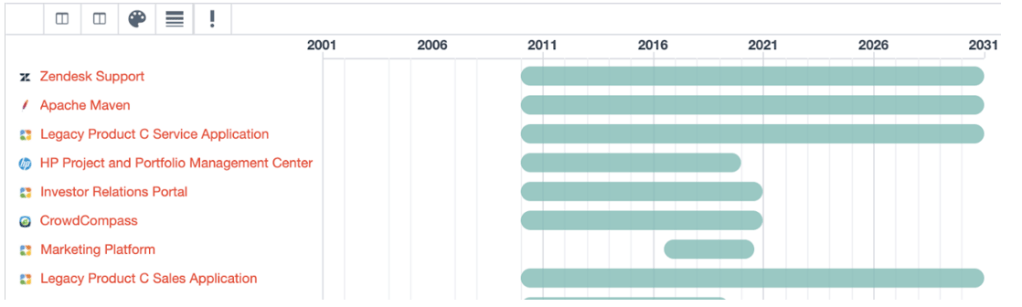
Picture above is from Ardoq. Look at their website for more details on the process: Getting Started with Application Rationalization | Ardoq Help
Rationalizing the application portfolio will not only reduce the cost of virtual applications and desktop infrastructure, but also on general datacentre infrastructure for hosting the applications. Using the Enterprise Architecture tool, you can have a better conversation between IT and the business on getting rid of those legacy applications.
Further you can also look at how you can reduce virtual applications and desktop cost by delivering application directly to low latency managed clients using ZTNA/SASE technologies. That leaves only high latency and unmanaged clients as virtual applications and desktop candidates. These can then be delivered effectively using DaaS service like Windows 365 Enterprise/Frontline or a PaaS solution like Azure Virtual Desktop. More on that in my other blog post: https://digitalworkplace.no/2024/04/05/time-for-a-new-approach-to-the-digital-workplace/ In that article I also highlight how you can assess and categorize user needs into personas. Combining the output from assessing application technical and business fitness with assessing the user “personas” you can find the sweets pot of your digital workplace needs.
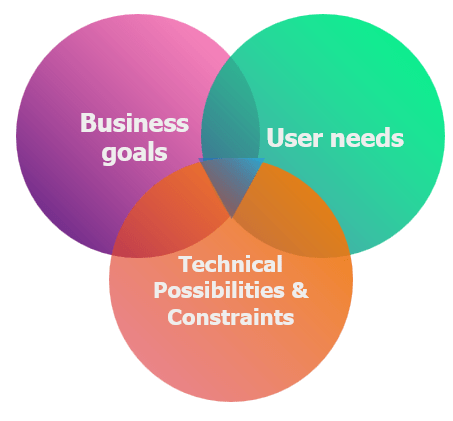
Once you have done this, you can map this into the technological landscape and choose the technology that best fits your Business, IT Architecture and user needs.

 Digital Workplace Blog
Leave a comment