I’ve been working a bit lately on how to provide secure vendor access, especially into OT networks, but also external IT consultants. Traditionally these have been handled with VPN, Remote Desktop/App or with a reverse session like TeamViewer. After the news of a security breach in TeamViewer, it’s even more important to look at how do we provide secure access to external users. I think it’s important to balance the user experience and user needs with security. I’ve tried to illustrate these alternatives in a diagram, as you can see neither of these solutions offer the balance we are looking for.

VPN
VPN is maybe the oldest solution. It provides full TCP access from vendor machine into the target networks. Userexperience can be quite good, if you just have one VPN client. But most vendors are connecting to multiple customers and environments and ending up with multiple conflicting VPN clients. Security wise, VPN can provide encryption, MFA and network level port restrictions, but it still provides direct access from the vendor “unmanaged” endpoint which you have no control of. A securiyt breach on a vendor machine, may quickly spread to multiple customers.

Remote Desktop
A remote desktop solution or jump station can be provided in combination with VPN or as a standalone solution. It acts as a layer between the client machine and the target OT/IT environments. Ideally placed in a network zone segmented from the OT/IT environments so you can provide FW rules and logging in between. Security wise, this is a little bit better because there is no direct access from untrusted vendor machine and the target environment. However, this setup may prevent vendor to use local installed IT/OT tools to manage the target systems, and you may have to install these tools on the jumpstation server. It’s also a bit static, because if you need to differentiate access to multiple environments for different users, you either need to open up for all target environments from the jumpstation or to create multiple jumpstations.

Team Viewer
TeamViewer and other similar solution offers a easy to set up solution where a software runs on client and target environment and provides an outbound connection to the middleware provider. This offers high flexibility for the vendors and low footprint in the target infrastucture, user experience is good, and security may also seem quite good; session is encrypted and authenticated. Many vendors prefer such a solution because of it’s simplicty and agility. But it’s based on trust in the middleware provider, and it lacks the inspection and control mechanisms that an enterprise require. With the recent security breach in TeamViewer, this shows how dangerous it is to assume trust in middleware providers without any additional security measures.
The fourth alternative
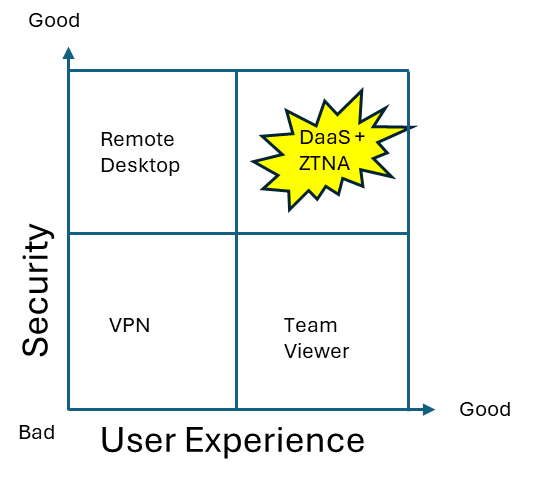
By providing a full managed desktop using a DaaS provider like Windows 365, you get a full company managed desktop that can be enrolled into Intune/Entra ID and placed in an isolated network. Vendors can access this machine and from here, run a ZTNA client. The ZTNA (Zero Trust Network Access) will dynamically be able to provide network access to just the target resources that it is entidled to. This can be done with group membership. By combining this with PIM (priviviledge access management) users can request access to groups on-demand. This will provide just-in-time access and logging, adding and thus additional security layer. Why not provide ZTNA directly from the vendors machine? Because this machine is not under your control and must be considered unmanaged. By launching it from the DaaS machine, you are launching it from a machine that you control. Access to internet from this machine can be restricted. Access from vendor machine to this machine can also be restricted, like file transfer and clipboard mapping etc.

Vendor can still run their management tools on the DaaS machine. These tools can be provided by you, using intune for example. Machine can be further locked down with applocker policies. Now you have an environment you completely control, and you can provide access from any vendor using only a webbrowser and a secured user account. You may further improve the solution with a secure file transfer zone, but I’m not going into that in this blogpost.
To summarize, by combining DaaS and ZTNA tehcnologies, I think it’s possible to create a secure access workstation solution for external vendors, that balances good security, agility and user experience.

 Digital Workplace Blog
Leave a comment